Last updated: November 6, 2026
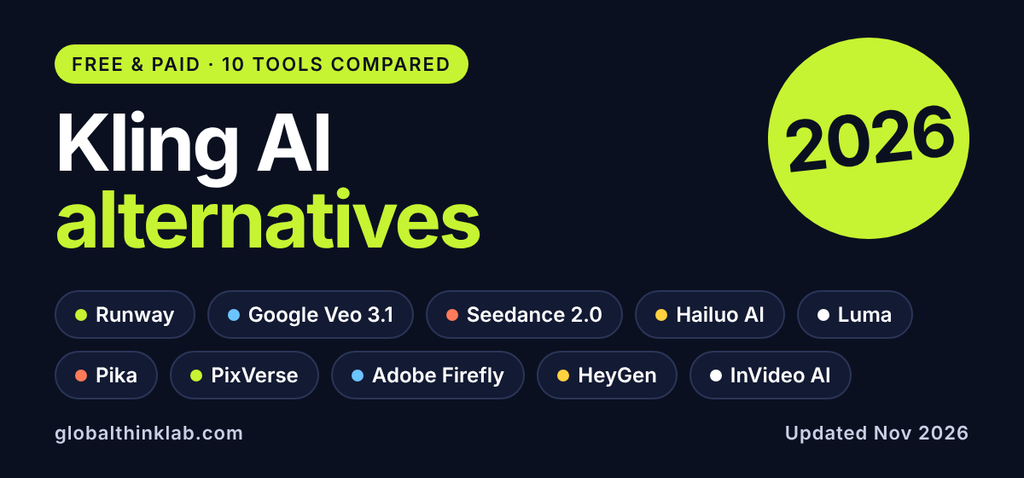
The best Kling AI alternative depends on what Kling is costing you. Runway suits teams that want editing tools around the generator, Google Veo 3.1 offers the most useful free daily allowance, and Hailuo, PixVerse, and Pika keep entry prices low. Kling remains a serious option: Kling 4.0 launched on October 15, 2026 with clips of up to 30 seconds. Still, credits spent on failed renders, queues, and slow support push many creators to look elsewhere. This guide compares 10 alternatives on pricing, limits, and fit, then recommends one for solo creators, small teams, enterprises, and developers. Details reflect public vendor pages and reports as of November 2026.
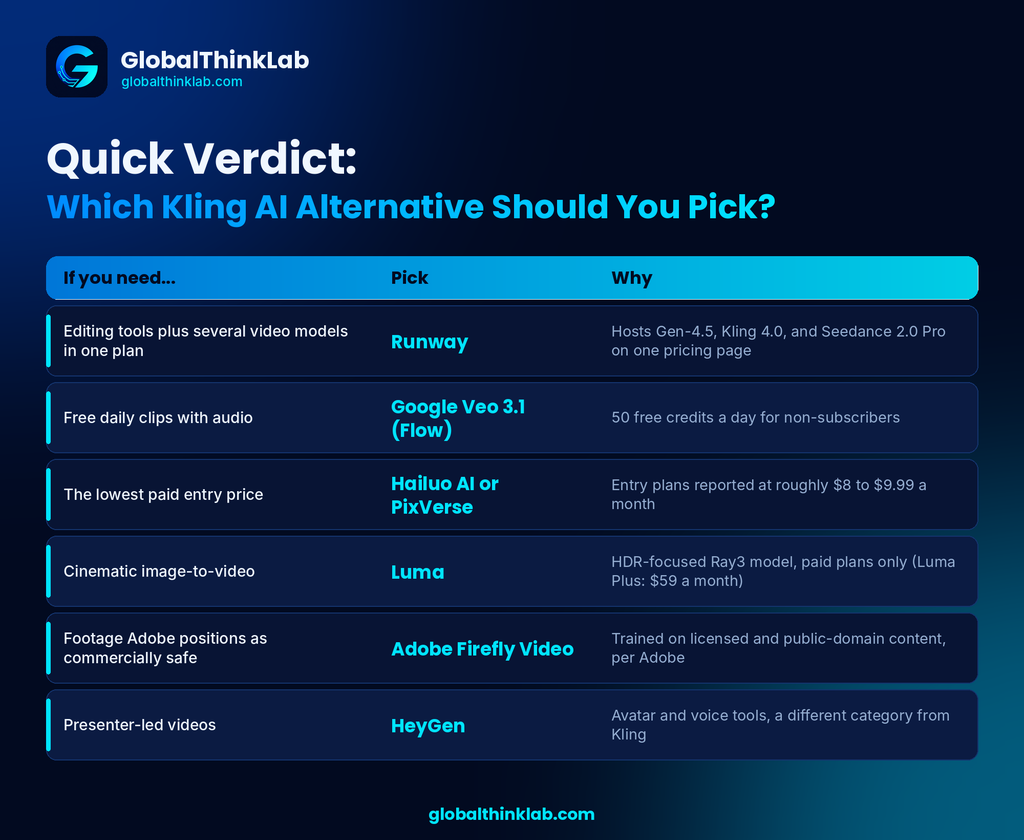
Quick Verdict: Which Kling AI Alternative Should You Pick?
| If you need… | Pick | Why |
| Editing tools plus several video models in one plan | Runway | Hosts Gen-4.5, Kling 4.0, and Seedance 2.0 Pro on one pricing page |
| Free daily clips with audio | Google Veo 3.1 (Flow) | 50 free credits a day for non-subscribers |
| The lowest paid entry price | Hailuo AI or PixVerse | Entry plans reported at roughly $8 to $9.99 a month |
| Cinematic image-to-video | Luma | HDR-focused Ray3 model, paid plans only , Luma plus : $59 a month |
| Footage Adobe positions as commercially safe | Adobe Firefly Video | Trained on licensed and public-domain content, per Adobe |
| Presenter-led videos | HeyGen | Avatar and voice tools, a different category from Kling |
Kling AI in 2026: What It Does Well and Where It Falls Short
Kling AI is the video model family from Kuaishou, the company behind the Kwai short-video app. Kling 3.0 arrived in February 2026 with multi-shot storyboards, native audio in several languages, and native 4K output for clips of up to 15 seconds.[“best AI video generators“]
Kling 4.0 builds on that. Kling’s own comparison page lists clips up to 30 seconds, up to 10 keyframes, up to 15 combined reference assets, two-channel stereo audio, and targeted video editing. Kuaishou’s launch material described the developer API and some HDR options as still coming. All of this is vendor-reported, not independently tested, so run your own prompts before committing.
Kling has a free Basic plan plus Standard, Pro, Premier, and Ultra tiers. Several trackers list Standard at $6.99 for the first month and $8.80 afterward, while others list $10 .
Why Creators Look for Kling AI Alternatives
Reviews and roundups keep raising the same five issues:
- Credit burn. Failed generations still consume credits, according to several third-party reviews. Kling’s paid-service terms describe activated memberships and credits as generally non-refundable.
- Queues. Free and non-priority users report long waits. Some Trustpilot reviewers say they saw “queue is busy” messages even after buying credits.
- Support and billing. Third-party reviews flag slow support and renewal prices that jump after the intro month.
- Workflow gaps. Kling focuses on generation. Teams that want brand kits, shared projects, or a wider editing suite often add a second tool.
- Data questions. Kuaishou is China-based. One third-party review lists Kling’s web and app servers in Singapore, with API endpoints in Singapore and Beijing. If you handle client assets, read Kling’s privacy policy first.
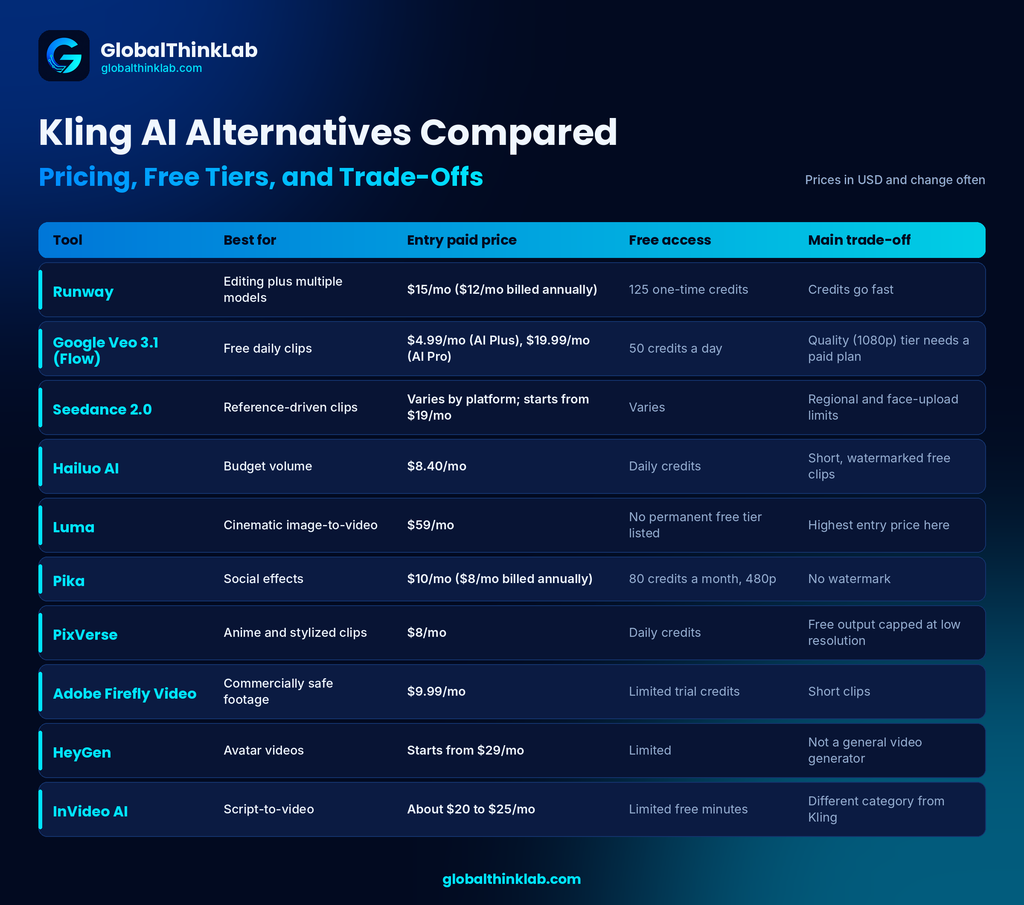
Kling AI Alternatives Compared: Pricing, Free Tiers, and Trade-Offs
Scan this table to build a shortlist, then read the reviews below. Prices are USDand change often.
| Tool | Best for | Entry paid price | Free access | Main trade-off |
| Runway | Editing plus multiple models | $15/mo, $12 billed annually | 125 one-time credits | Credits go fast |
| Google Veo 3.1 (Flow) | Free daily clips | $4.99/mo (AI Plus), $19.99/mo (AI Pro) | 50 credits a day | Quality(1080) tier needs a paid plan |
| Seedance 2.0 | Reference-driven clips | Varies by platform Starts from $19/mo | Varies | Regional and face-upload limits |
| Hailuo AI | Budget volume | $8.40 /month | Daily credits | Short, watermarked free clips |
| Luma | Cinematic image-to-video | $59/month | permanent free tier listed | Highest entry price here |
| Pika | Social effects | $10/mo, $8 billed annually | 80 credits a month, 480p | No watermark |
| PixVerse | Anime and stylized clips | $8/mo | Daily credits | Free output capped at low resolution |
| Adobe Firefly Video | Commercially safe footage | $9.99/month | Limited trial credits | Short clips |
| HeyGen | Avatar videos | starts from $29/month | Limited | Not a general video generator |
| InVideo AI | Script-to-video | About $20 to $25/mo | Limited free minutes | Different category from Kling |
10 Best Kling AI Alternatives for AI Video Generation in 2026
Skip Sora. OpenAI shut the Sora app on April 26, 2026 and the Sora API on September 24, 2026, so older listicles that recommend it are out of date.
1. Runway: Best Kling AI Alternative for Editing and Multi-Model Workflows
Runway is the safest pick if you want generation and finishing in one subscription. Its pricing page lists Gen-4.5 next to third-party models, including Kling 4.0 and Seedance 2.0 Pro, so you can compare models without juggling accounts. Plans run Free (125 one-time credits), Standard at $15(12 if billed annually ) a month, Pro at $35($28 if billed annually ), and Max at $95($76 if billed annually ) , with about 20% off annual billing .
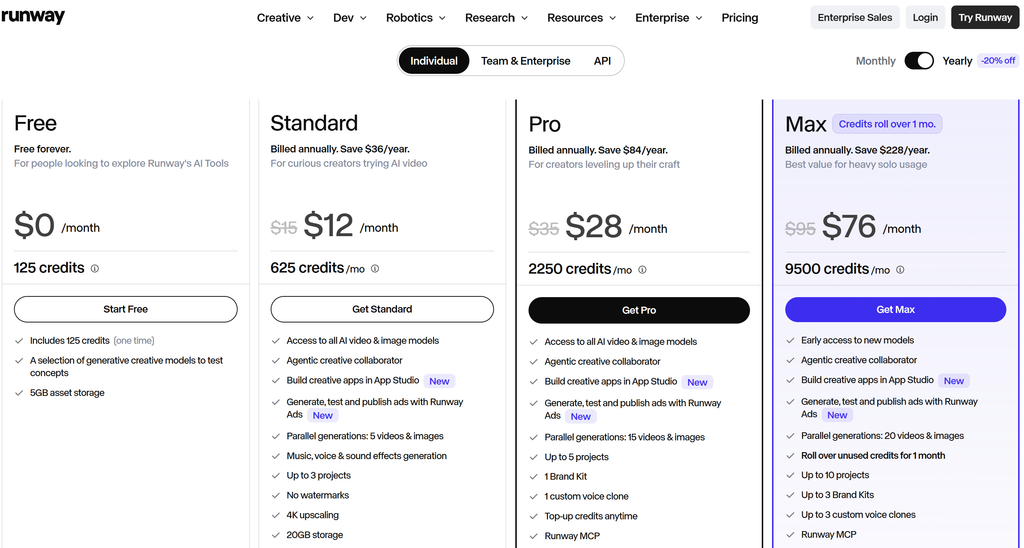
- Pros: Several models under one plan; no watermarks on paid plans; parallel generations; Max rolls over one month of credits.
- Cons: Credits go quickly (Runway’s page says Standard’s 625 credits equal about 52 seconds of Gen-4.5); Standard and Pro credits do not roll over.
- Who it’s best for: Small teams and editors who want generation and finishing tools together.
2. Google Veo 3.1 (Flow): Best Free Kling AI Alternative
Google gives anyone without a paid Google AI plan 50 Flow credits a day, usable on Veo 3.1 Lite, Fast, and Quality, according to Google’s help page. Lite costs 10 credits and Fast costs 20, so a free account gets roughly five Lite clips or two Fast clips a day. Quality costs 100 credits, which free users cannot reach. Paid Google AI plans add monthly credits: Plus at $4.99 (200 credits), Pro at $19.99 (1,000), and Ultra from $99.99. Veo 3.1 generates audio with the video.
- Pros: Real free daily credits; audio included; no card needed to start.
- Cons: Free credits expire daily; the Quality model needs a paid plan; the Gemini app has moved to a different model, so use Flow if you want Veo by name; availability in the UK, Canada, and Australia needs checking .
- Who it’s best for: Anyone testing AI video before paying.
3. Seedance 2.0 (Dreamina and CapCut): Best Kling AI Alternative for CapCut Users
ByteDance’s Seedance 2.0 rolled out through CapCut and Dreamina from March 2026 and expanded to the US in April, per CapCut’s newsroom. It also appears inside Runway. A newer Seedance 2.5 exists, with separate pricing . Entry cost varies by platform, and one Dreamina listing shows US renewals at $15 a month .
- Pros: Available through familiar CapCut tools; also reachable via Runway; entry pricing looks competitive.
- Cons: Not available in every region; uploads of realistic faces as references are reportedly blocked; the model drew copyright complaints around launch, so check licensing for client work.
- Who it’s best for: Social creators who already edit in CapCut.
4. Hailuo AI (MiniMax): Best Budget Kling AI Alternative
Hailuo is MiniMax’s video app, with models listed on pricing guides as Hailuo 2.3 and the newer MiniMax H3 .It offers daily free credits, and entry paid plans are reported anywhere from about $8.40to $14.99 a month depending on the source and region .[ “AI automation for business“]
- Pros: Low entry price; free daily credits; text-to-video and image-to-video.
- Cons: Reviews describe the free tier as a trial with watermarks and short clips; roundups say it lacks native audio ; allowances differ by source.
- Who it’s best for: Budget creators making many short clips.
5. Luma (Dream Machine and Ray3): Best Kling AI Alternative for Cinematic Image-to-Video
Luma’s pricing page currently lists Plus at $30 a month, Pro at $90, and Ultra at $300, with annual billing saving up to 20% . Luma markets its Ray3 model for HDR output, which matters if you grade footage in post. There is no permanent free tier on the current page, though a watermarked legacy plan appears in Luma’s help center .
- Pros: HDR-oriented output; paid plans include commercial use and no watermark .
- Cons: Highest entry price on this list; subscribing through the iOS app may cost more than the web .
- Who it’s best for: Filmmakers and agencies producing hero shots and previsualization.
6. Pika: Best Kling AI Alternative for Quick Social Effects
Pika 2.5 is built around effects such as Pikaffects, Pikaframes, and Pikascenes. The free plan gives 80 credits a month at 480p, with watermarks and no commercial use. Paid plans are listed at about $10 a month for Standard, $35 for Pro, and $95 for Fancy, with roughly 20% off annually . Commercial rights reportedly differ by plan, and trackers noted a change in October 2026, so confirm before client work .
- Pros: Fast, playful effects; simple interface; free plan to test.
- Cons: Free output is low resolution and watermarked; commercial licensing varies by plan.
- Who it’s best for: Creators making short clips for Instagram and TikTok.
7. PixVerse: Best Kling AI Alternative for Anime and Stylized Clips
PixVerse leans toward anime, social video, and effect templates. The Basic plan is free with daily credits and watermarked output, though sources disagree on the exact numbers (60 initial and 30 daily credits on the current plan table, 90 and 60 in older docs) [VERIFY]. Standard is listed at $10 a month, Pro at $30, and Premium at $60 . Daily credits expire the same day.
- Pros: Free daily credits; low entry price; strong template library.
- Cons: Free clips are watermarked and capped at low resolution; daily credits do not stack.
- Who it’s best for: Anime, fantasy, and effects-driven content creators.
8. Adobe Firefly Video: Best Kling AI Alternative for Commercially Safe Footage
Adobe says Firefly Video is trained on licensed Adobe Stock and public-domain content, and positions it as safe for commercial use. It plugs into Premiere Pro and Adobe Express. Standard is listed at $9.99 a month, and Pro at $19.99 or $29.99 depending on the source . Clips are short, around five seconds at 1080p .
- Pros: Clear IP positioning; fits Adobe workflows; Content Credentials on outputs.
- Cons: Short clips; retakes consume credits, and some users have asked Adobe for cheaper previews.
- Who it’s best for: Brands and agencies already inside Creative Cloud.
9. HeyGen: Best for Talking-Head and Avatar Videos
HeyGen does a different job than Kling. It turns a script into a presenter-led video with avatars, voice, and multilingual dubbing. Third-party listings show paid plans starting around $24 to $29 a month . Synthesia covers similar ground for training content.
- Pros: Avatar, voice, and translation in one tool.
- Cons: Not built for cinematic B-roll or open-ended scenes.
- Who it’s best for: Sales, training, and localized explainer videos.
10. InVideo AI: Best for Script-to-Video Content
InVideo AI assembles a full video from a text prompt, handling script, stock footage, voiceover, and edits. Third-party listings show plans from about $20 to $25 a month, with limited free minutes . It trades generative realism for speed and volume.
- Pros: Fast long-form output; low effort per video.
- Cons: Relies heavily on stock-style footage; a different category from Kling.
- Who it’s best for: Faceless YouTube and social channels.
How to Choose a Kling AI Alternative in 4 Steps
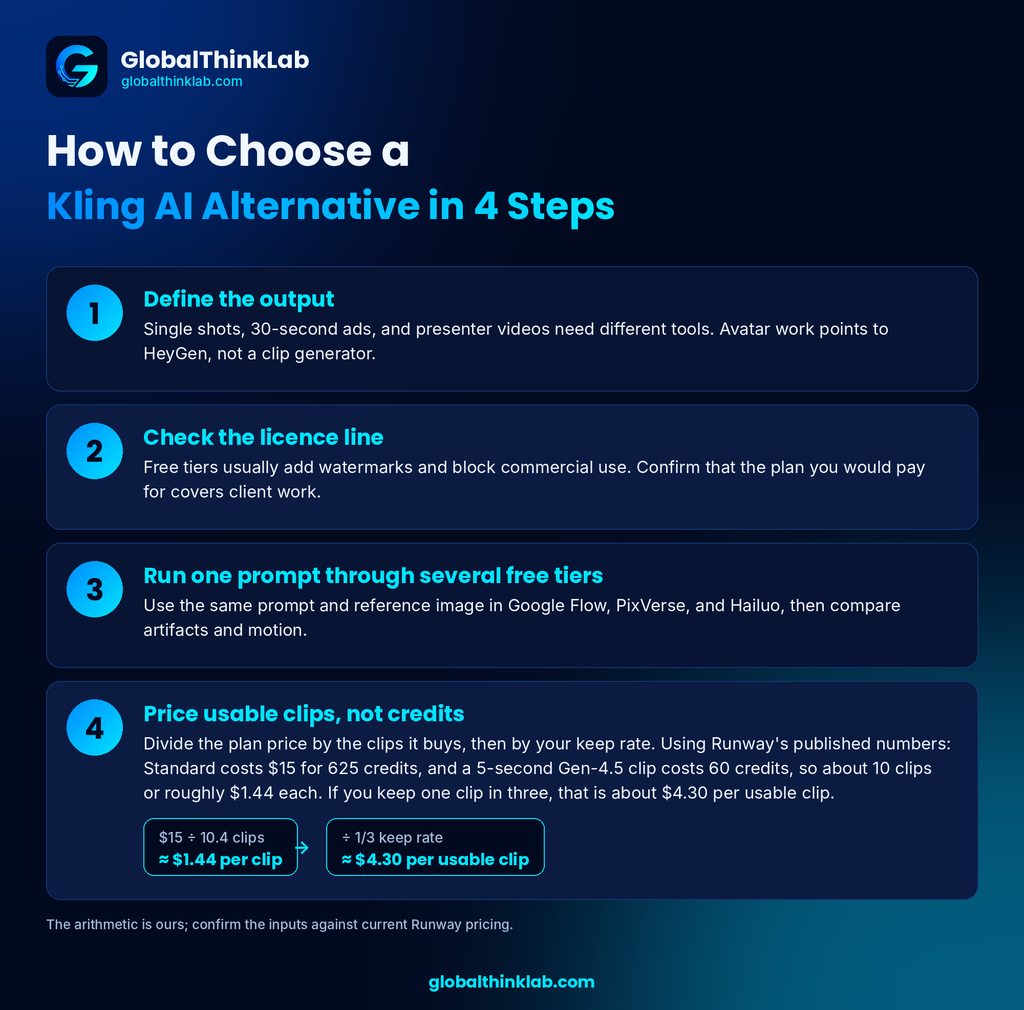
- Define the output. Single shots, 30-second ads, and presenter videos need different tools. Avatar work points to HeyGen, not a clip generator.
- Check the licence line. Free tiers usually add watermarks and block commercial use. Confirm that the plan you would pay for covers client work.
- Run one prompt through several free tiers. Use the same prompt and reference image in Google Flow, PixVerse, and Hailuo, then compare artifacts and motion.
- Price usable clips, not credits. Divide the plan price by the clips it buys, then by your keep rate. Using Runway’s published numbers: Standard costs $15 for 625 credits, and a 5-second Gen-4.5 clip costs 60 credits, so about 10 clips or roughly $1.44 each. If you keep one clip in three, that is about $4.30 per usable clip. The arithmetic is ours; confirm the inputs .
Verdict: Best Kling AI Alternative by Reader Type
- Solo creator on a budget: Start with Google Flow’s free daily credits. Add PixVerse or Hailuo if you need more volume, or Pika if social effects matter most.
- Small team or agency: Runway Pro or Max. You get several models, Brand Kits, and finishing tools in one bill.
- Enterprise: Adobe Firefly Video for its commercially safe positioning, or Runway’s enterprise tier for team controls. Google Cloud shops can look at Veo through Vertex AI .
- Developer: Compare the Runway API, Veo through the Gemini API or Vertex AI, Luma’s API, and Kling’s API. Kling said its developer API for 4.0 was still coming at launch .
- Staying with Kling: Keep your first purchase small, test prompts on cheap credits, and read the renewal terms before you give up on it for a Kling AI alternative.
FAQ
Which AI is better than Kling?
No single tool beats Kling everywhere. Runway is stronger for editing and multi-model access, Google Veo 3.1 is stronger for free daily use, and Luma suits cinematic image-to-video. Kling stands out for long clips, with Kling 4.0 reaching 30 seconds according to Kling. Pick by workflow, then test one prompt across free tiers.
What are some free alternatives to Kling AI?
The best free Kling AI alternative is Google Flow, which gives non-subscribers 50 credits a day for Veo 3.1 clips. PixVerse and Hailuo list free daily credits, and Pika’s free plan includes 80 monthly credits. Free clips usually carry watermarks, lower resolution, and no commercial rights, so confirm each vendor’s terms before using them for client work .
Can we use Kling AI for free?
Yes, with limits. Kling’s Basic plan costs $0, and its FAQ says non-subscribers can claim monthly free credits when they log in, though the amount is not published. Free output carries a watermark and is not licensed for commercial use. Older guides quoting 66 free credits a day are unconfirmed, so check your balance.
Which is better, Kling AI or Runway AI?
Neither wins outright. Kling suits long clips and reference-heavy shots, with Kling 4.0 reaching 30 seconds. Runway suits teams that want editing tools and several models in one plan. Runway even lists Kling 4.0 on its pricing page, so you can try both through one account. Compare credit cost per usable clip before paying.
What is the biggest problem with Kling AI?
Credits, most often. Trustpilot reviews and third-party roundups report credits spent on failed or unusable generations, long queues for free or non-priority use, and slow support. Kling’s paid-service terms call activated memberships and credits generally non-refundable, so start small and test prompts on a modest plan before buying more.
[…] Kling AI Alternatives: 10 Free and Paid Picks for 2026 […]
The reminder to separate vendor-reported specs from independently tested results is important—especially for clip length and upcoming features. I’d be interested in a comparison that tests the same prompts across multiple runs, since one-off results can overstate consistency. Disclosure: I’m affiliated with Kavello, an independent Seedance-based AI video generator.