Higgsfield AI is a credit-based creative studio that puts leading video models, including Kling, Veo and Seedance, behind one subscription, then adds its own tools for camera moves, character consistency and lip sync. In October 2026, paid plans run from about $9 to $129 a month. Premium clips burn credits fast. If you want something cheaper or broader, OpenArt, Runway, Kling and Krea are the main alternatives. This guide covers pricing, an OpenArt vs Higgsfield comparison, pros and cons, and a pick for each type of buyer.
Quick Verdict: Higgsfield AI vs the Main Alternatives
- Choose Higgsfield AI if you want Kling, Veo and Seedance under one login and you will watch your credit balance.
- Choose OpenArt if images and consistent characters matter as much as video.
- Choose Kling or Krea if you want a free tier to learn on before you pay anyone.
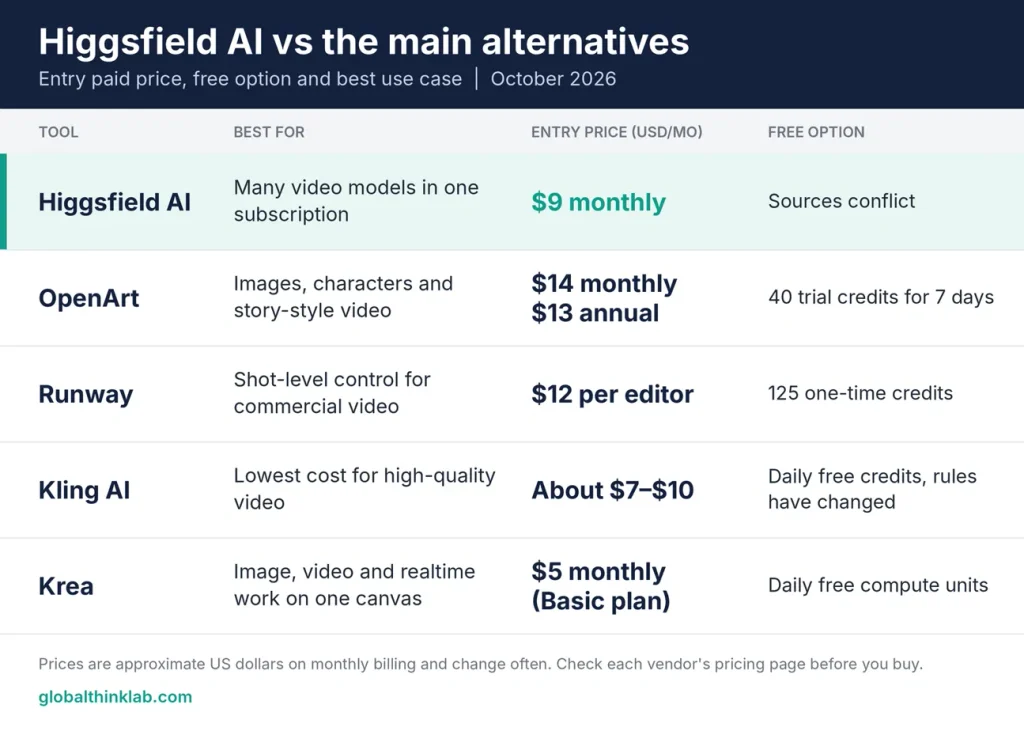
| Tool | Best for | Entry paid price (USD/month) | Free option |
| Higgsfield AI | Many video models in one subscription | $9 monthly | Sources conflict |
| OpenArt | Images, characters and story-style video | $14 monthly, $13 annual | 40 trial credits for 7 days |
| Runway | Shot-level control for commercial video | $12 per editor | 125 one-time credits |
| Kling AI | Lowest cost for high-quality video | About 7–10 $ | Daily free credits, rules have changed |
| Krea | Image, video and realtime work on one canvas | $5 monthly , basic | Daily free compute units |
Prices were compared across vendor pages and independent reviews in October 2026. Plans and credit costs change often, so check each pricing page before you buy.
Higgsfield AI Review: What It Does in 2026
Higgsfield AI works mainly as an aggregator: one account that reaches many third-party image and video models, plus a few tools Higgsfield built itself.
Reviewers list models such as Veo 3.1, Kling 3.0, Sora 2, Seedance 2.0 and 2.5, Wan, Nano Banana Pro and Seedream. The count varies by source, from 15+ to 30+, so treat any single number with care .
The in-house tools are what set it apart from a plain model reseller:
- Cinema Studio: camera-movement controls for shots that look directed rather than random.
- Soul ID: keeps one character recognisable across images and video.
- Speak: lip-synced talking video, useful for UGC-style ads.
Every generation spends credits. The cost depends on the model, the resolution and the clip length. One independent review puts premium models at 40 to 70 credits per generation, while lighter models cost far less . Developers can also use a Higgsfield API, which Higgsfield says runs on a separate balance from the app subscription.
The typical buyer is a marketer, social creator or small studio that wants to try several models without paying for each one separately. This guide draws on vendor pricing pages, independent reviews and public user feedback.
Higgsfield AI Pricing in 2026: What You Will Actually Pay
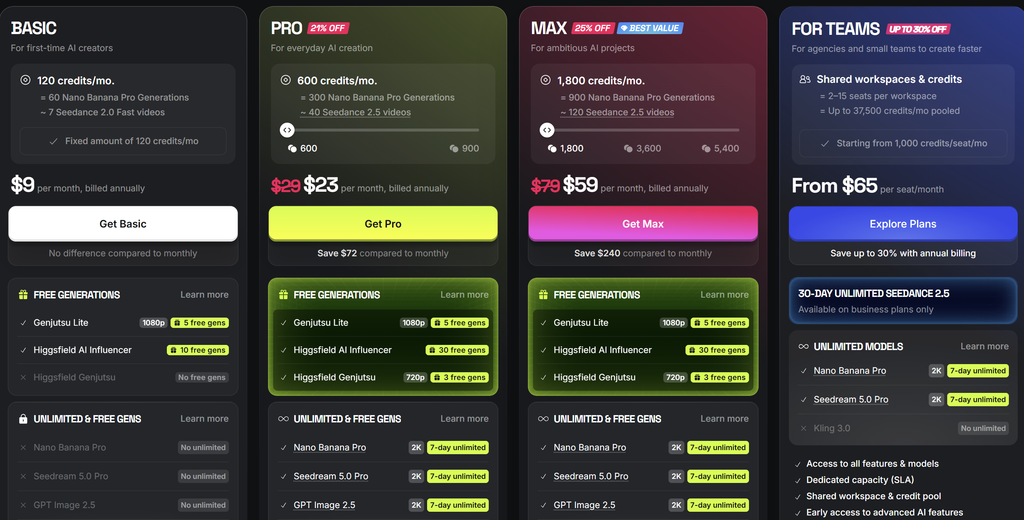
Individual plans cost between $9 and $129 a month in October 2026, but the published numbers do not agree. One Higgsfield blog post lists Starter, Plus and Ultra at $15, $49 and $129 with 200, 1,000 and 3,000 credits. Another page on Higgsfield’s domain and three independent guides list $19, $59 and $129 with 270, 1,200 and 3,000 credits. We could not confirm which set is current .
| Plan | Monthly billing (USD) | Credits per month | Notes |
| Free | $0 | None, or about 10 per day (sources conflict) | Basic models only; watermark reported |
| Starter | 9$ | 200–270 | One guide says Seedance 2.0 and 2.5 are not included |
| Pro | 23$ on annual billing | 1,000–1,200 | Full model line-up reported for Pro and max |
| Max | 59$ on annual billing | 3,000 | Same access as Plus with a bigger credit pool |
| Teams | From $65 per seat, billed annually | Per seat | From an older source; confirm with sales |
How credits get spent
Plan credits do not roll over, according to two independent guides, so unused balance is lost at renewal . Third-party estimates put Seedance 2.5 at about 72 credits per take and Veo 3 with audio at 58 credits for an 8-second clip. At those rates, Plus covers roughly 16 Seedance 2.5 takes or about 20 Veo 3 clips, and Starter covers about three Seedance 2.5 takes. One review assumes three to five attempts per usable clip, which cuts those numbers further .
Top-up packs exist. One comparison site reports about $5 per 100 credits, valid for roughly 90 days.
What “unlimited” means here
Higgsfield’s own blog says Plus and Ultra include a 365-day unlimited set of six image models, plus seven-day windows on selected flagship models. Flagship video models are not unlimited all year. One independent reviewer calls the offer mostly image models .
Pricing notes for UK, Canada and Australia readers
Prices above are US dollars. Higgsfield says prices vary by country and exclude tax, so expect VAT or GST and local pricing at checkout .
Higgsfield AI Pros and Cons
Higgsfield AI is strong on model choice and weak on cost predictability. That is the short version of what reviewers and users report.
Pros
- Many leading video and image models behind one login, so you skip several separate subscriptions.
- In-house tools for camera control (Cinema Studio), character consistency (Soul ID) and lip sync (Speak).
- Commercial use is listed on paid plans in Higgsfield’s own pricing guide.
- A developer API is available, billed on a separate balance from the app.
- Many Trustpilot reviewers praise support speed and quick refunds on credit errors.
Cons
- Premium models use credits quickly. A Starter plan covers only a handful of top-tier clips.
- Published prices and credit counts differ between pages, even on Higgsfield’s own domain.
- Plan credits do not roll over.
- “Unlimited” covers a narrow set, mostly image models plus short flagship windows.
- Some reviewers report charges after cancellation and denied refunds. Higgsfield’s own help content lists refund denials and post-cancellation charges among recurring complaints .
- It is largely a model aggregator, so you can reach some of the same models directly from their makers.
Trustpilot showed a rating of about 4.0 out of 5 from roughly 3,500 reviews in a July 2026 snapshot, with a clear split between praise and billing complaints . Read recent reviews yourself before you commit to an annual plan.
Who Higgsfield AI is best for
- Marketers and social creators making short ads, UGC-style clips and product shots.
- Solo creators who want to compare Kling, Veo and Seedance output without three subscriptions.
- Developers who want an API alongside a creative app.
Who should skip it
- Anyone who needs a fixed, predictable monthly cost.
- Heavy iterators who regenerate the same shot many times.
- Image-first creators, who get more credits per dollar elsewhere (see the OpenArt comparison below).
- OpenArt AI vs Higgsfield: Which One Fits Your Work?
Pick Higgsfield AI if video is the main job and you want model choice plus camera and lip-sync tools. Pick OpenArt if you make a lot of images, need consistent characters, or want a bigger credit pool for the money.
| Higgsfield AI | OpenArt | |
| Core focus | Video first: multi-model clips, camera control, lip sync | Images, video and audio in one studio |
| Models | 15–30+ third-party models plus own tools | 100+ image and video models |
| Entry paid plan (monthly) | 9$ (Starter) | 14(13 annual) |
| Mid plan (monthly) | 23$ (Pro) | $27 (Plus), $44 (Pro) |
| Top individual plan (monthly) | 59$ (Max) | $240 (Wonder), $175 annual |
| Monthly credits | 200–270, 1,000–1,200, 3,000 | 4,000 up to about 106,000 |
| Free option | Sources conflict | 40 trial credits, 7 days |
| Commercial use | Listed on paid plans | Not on Starter; Plus and above |
| Standout features | Cinema Studio, Soul ID, Speak | Character consistency, One-Click Story, LoRA training |
| API | Yes, separate balance | Not clearly listed |
How to read the credit numbers
OpenArt’s credit totals look much larger than Higgsfield’s, but credits are not a shared unit. Each platform prices a generation differently, so compare the cost of a finished clip, not the credit count. One comparison site estimates $2 to $4 per usable clip on Higgsfield Plus . Work out the same figure for OpenArt using the models you actually plan to use.
Where each one wins
- OpenArt wins on image volume, character and story tools, and entry price.
- Higgsfield AI wins on dedicated video tooling and access to several flagship video models in one place.
- OpenArt’s Starter plan excludes commercial use, so a business should budget for Plus or above .
Some teams keep both: OpenArt for image and concept work, Higgsfield for final video renders.
The Best Higgsfield AI Alternative for Each Use Case
The right Higgsfield AI alternative depends on what you are replacing: the model access, the price, or the creative tools. Four options cover most buyers. OpenArt is covered in the comparison above, so it gets a short entry here.
Runway: best for shot-level control
Runway is a long-running AI video platform with its own models and some partner models inside the app. Monthly-billed plans are Free (125 one-time credits), Standard at $15, Pro at $35 and Max at $95, priced per editor. Max replaced the older Unlimited plan on 1 June 2026. Lower annual rates appear in some listings .
- Pros: fine control over shots and editing; a shared credit balance across editors in a workspace; an Enterprise tier with SSO and analytics .
- Cons: Standard and Pro credits reset each month without rollover; API credits are billed separately; the free plan covers only a few test clips.
- Best for: small studios and teams that care about control over a finished shot.
Kling AI: best for low-cost video
Kling comes from Kuaishou and runs the Kling 3.0 model that Higgsfield also resells. Guides list paid plans at roughly $7 to $10 (Standard), $30 to $37 (Pro), $75 to $92 (Premier) and $180 (Ultra), with annual billing about a third cheaper. Native 4K output was priced at 30 credits per second in a July 2026 update .
- Pros: low entry price and a free tier; reviewers rank Kling 3.0 near the top for quality.
- Cons: one model family only; plan pricing is hard to pin down across sources; free clips are short and watermarked. Older guides promise 66 free credits a day, but a 2026 guide says that allowance is no longer guaranteed .
- Best for: budget-first creators. If most of your Higgsfield credits go to Kling, price the same clips on Kling directly before you subscribe.
Krea: best for image, video and upscaling in one canvas
Krea combines realtime image generation, video, upscaling and node-based workflows. Reported plans are Free (about 100 compute units a day), Basic at $9, Pro at $35, Max at $63 to $70 and Business at $160 to $200 . One guide says top models and full video access start at Pro . A price tracker recorded quota changes in September and October 2026, so check the live page.
- Pros: a free tier that renews daily; wide toolset; workflow builder for repeatable pipelines.
- Cons: compute-unit use is hard to predict for video; the best models sit on higher plans.
- Best for: designers and creative teams who mix image, upscale and video work.
OpenArt: best for images, characters and story-style clips
OpenArt starts at 14amonth(13 on annual billing) and offers 100+ models, character consistency and a One-Click Story tool. Commercial use starts at the Plus plan . See the head-to-head table above.
Websites Like Higgsfield AI Worth a Look
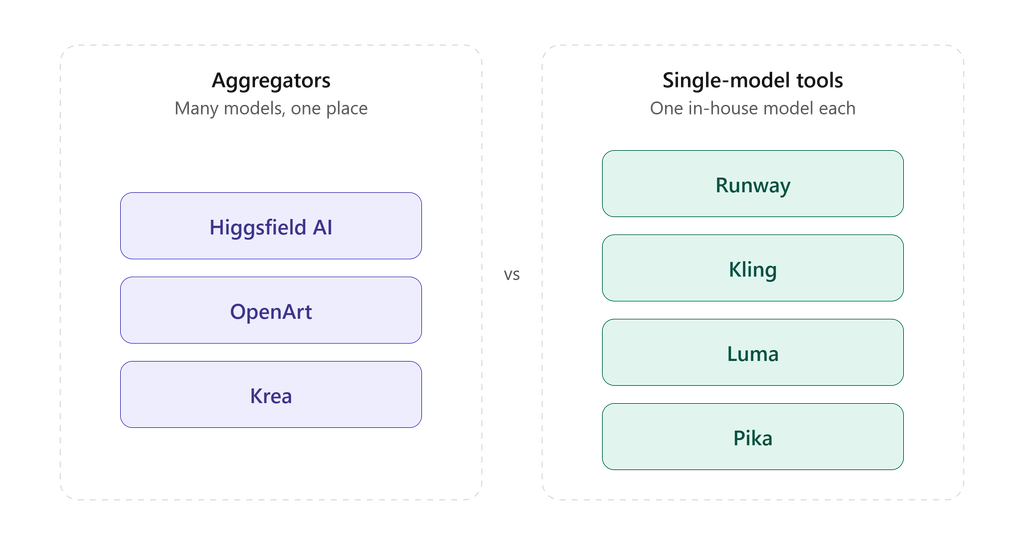
Websites like Higgsfield AI fall into two groups: aggregators that offer many models in one place, and single-model makers that sell their own engine. OpenArt and Krea belong to the first group. Runway, Kling, Luma and Pika belong to the second.
The tools below appear in third-party roundups of Higgsfield alternatives. We have not checked them against each vendor’s own page, so treat every row as a lead to verify.
| Site | Type | Why people shortlist it | Free plan |
| Luma AI | Own video models | Per-second pricing across its catalog, per a competing vendor’s guide | Listed in roundups |
| Pika | Own video models | Positioned for quick social clips | Listed in roundups |
| PixVerse | Own video models | Frequently named as a direct, low-cost replacement | Listed in roundups |
| Hailuo AI | Own video models | Freemium, with several pricing structures | Listed in roundups |
| LTX Studio | Multi-model workflow | Covers the full production flow; this comes from its own comparison page | Listed on its own page |
| Arcads | UGC-style ad avatars | A competitor’s blog cites 300+ actors for UGC ads | Not confirmed |
How to Pick a Higgsfield AI Alternative Without Wasting Credits
Compare tools by cost per finished clip, not by plan price. Five steps get you there:
- List the three clip types you make most, with length and resolution (for example a 5-second product shot at 1080p).
- Name the model each clip needs. Credit cost depends on the model, so “Kling 3.0” and “Soul V2” are different budgets.
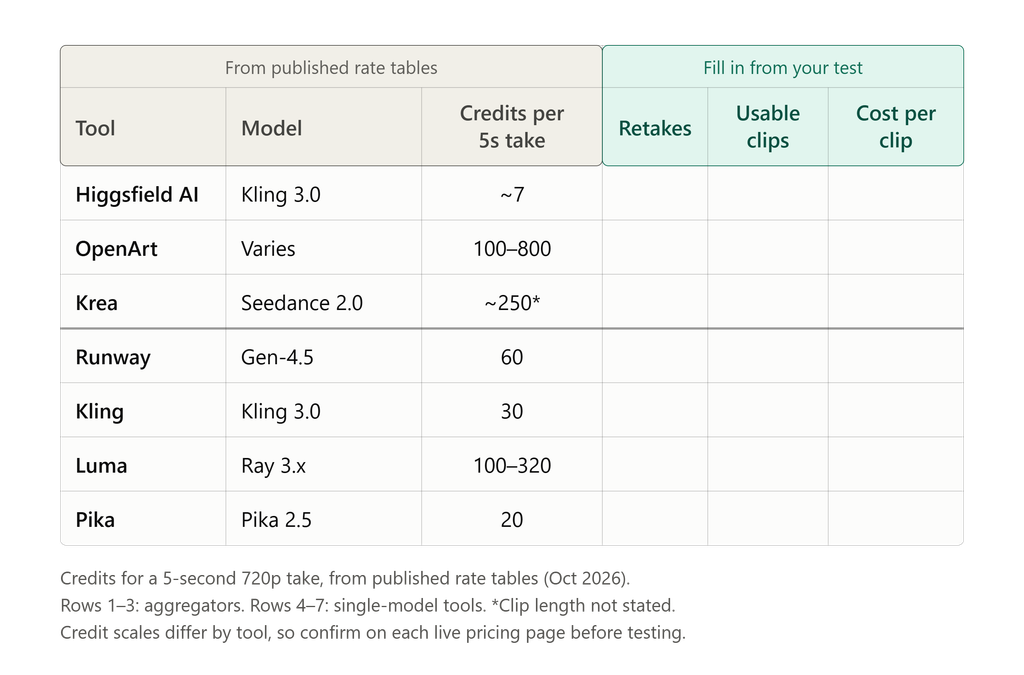
- Run the same test prompt on each tool, using a free tier or a one-month plan. Write down credits spent and how many retakes you needed.
- Divide the monthly price by the usable clips you got. That figure is your real cost per clip.
- Start on monthly billing, confirm commercial-use and watermark rules for your plan, and set a calendar reminder before renewal.
Verdict: Which Higgsfield AI Option Should You Choose?
Start on a free tier from Kling or Krea to learn how many credits your work really uses. Pay for Higgsfield AI only if you want several flagship models under one login and accept the credit math.
| Reader | Best pick | Why |
| Solo creator, video-first | Higgsfield AI Pro, after a free test on Kling | Several models in one place; Soul ID and Speak help with characters and talking clips |
| Solo creator, image-first | OpenArt Pro | Larger credit pool and character tools; commercial use starts at Plus |
| Small team or agency | Runway Pro or Max, or Higgsfield Teams | Runway shares one credit balance across editors; Higgsfield lists per-seat team plans |
| Enterprise | Runway Enterprise or Higgsfield Enterprise | Runway lists SSO and analytics . With either vendor, get billing, refund and data terms in writing |
| Developer | Higgsfield API, Runway API or Kling API | Each API bills separately from its consumer app, so budget for it on its own |
If you are still unsure, run the five-step test above on two tools for one month each. It costs less than one wrong annual plan.
Higgsfield AI FAQ
How much does Higgsfield AI cost in 2026?
Higgsfield AI individual plans run from about $9 to $129 a month in October 2026, depending on which pricing page you trust. Starter is 9$, Pro 23$ and Max $59 on monthly billing, with cheaper annual rates on Pro and Max. Prices exclude tax and vary by country, so check the live page before paying .
Is Higgsfield AI free?
Not fully. Sources disagree: one lists 10 credits a day on basic models, others say the free tier has no credits and adds a watermark, and one reports a $3 one-time offer for 40 credits. Paid plans starts from $9 a month. Check the current signup page to see what a new account receives .
Is Higgsfield AI worth it?
Higgsfield AI is a real, working service with thousands of Trustpilot reviews, rated about 4.0 out of 5 in a July 2026 snapshot . Reviews split between praise for output and support and complaints about billing, refunds and credit use. It suits people who want many models under one login. Pay monthly first and read the cancellation terms.
OpenArt vs Higgsfield: which is better?
Neither wins everywhere. Higgsfield AI suits video-first work with several flagship models plus camera and lip-sync tools. OpenArt suits image-heavy work, character consistency and bigger credit pools, from $9 a month. Credits are not comparable across the two, so test one real clip on each and compare the cost per finished clip.
What is the best free alternative to Higgsfield AI?
Kling AI and Krea are the strongest free starting points. Kling has offered daily free credits, though one 2026 guide says that allowance is no longer guaranteed. Krea’s free plan renews about 100 compute units a day. Runway gives 125 one-time credits and OpenArt a 40-credit trial. Free tiers are small and often watermarked
Appreciated the focus on Higgsfield AI Review 2026: Pricing & Best Alternat. Holding identity across cuts is a fairer filter than peak resolution alone.
Thanks! Totally agree—temporal consistency and identity preservation matter far more for real production workflows than just high peak resolution.
Highlighting Higgsfield AI Review 2026: Pricing & Best Alternat makes this more useful than a generic ranking. Comparing failure modes beats feature checklists.
Appreciate that! Feature lists don’t tell you how a tool performs on a deadline—showing where it actually breaks is what helps people decide if it fits their workflow. Glad the breakdown was useful!
The cost-per-finished-clip comparison is more useful than comparing raw credit totals. For the Speak/lip-sync use case, it would help to define what makes a take usable before counting retakes: try the same short, consented input with a pause, a few clear b/p/m sounds and a small head turn, then watch for a moving mouth during silence, timing drift and changes to teeth or facial identity. Keep the source audio and export frame rate consistent across comparisons. That would make the talking-video row easier to assess without assuming a higher resolution means better sync. Disclosure: this is an AI-assisted comment from the Visemix team; these are suggested evaluation criteria, not results from testing the products in this review.
Interesting take in “Higgsfield AI Review 2026: Pricing & Best Alternatives – Global Think Lab”. Clear, concrete guidance is more useful than vague “make it better” edits. When photos are soft or aged, I also use a dedicated enhancer (MyEnhancer — https://myenhancer.com) that keeps faces and textures looking natural.