
Last reviewed: October 2026. Prices and plans change often, so check the vendor pages before you buy.
If you want an AI-powered editor with autocomplete and a visual interface, pick Windsurf. If you want an AI agent that takes a task, works through your codebase, runs commands and fixes its own errors, pick Claude Code. They solve different problems, so the better tool depends on how you like to work.
This guide compares Windsurf vs Claude Code on autocomplete, codebase context, agentic coding, workflow fit and pricing. You’ll also get a verdict for solo developers, small teams and enterprises, plus a FAQ at the end.
Quick verdict
- Choose Windsurf if you want autocomplete, inline edits and a familiar VS Code-style editor at a lower entry price.
- Choose Claude Code if you hand off bigger jobs (refactors, bug hunts, test suites) and are happy working from a terminal or an IDE extension.
- Biggest gap: Windsurf has autocomplete. Claude Code does not.
- Biggest cost gap: Windsurf has a free tier. Claude Code needs a paid Claude plan or API credits.
- Naming note: Windsurf is now called Devin Desktop (more on that below).
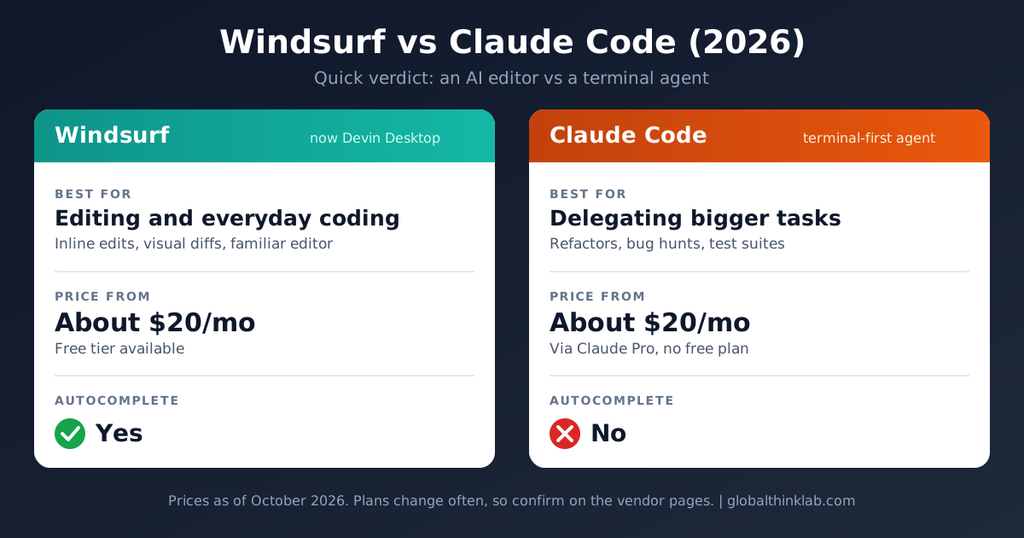
Windsurf vs Claude Code: Key Differences at a Glance
The Windsurf vs Claude Code question comes down to one idea. Think of Windsurf as a pair programmer sitting beside you, finishing your lines and answering questions as you type. Think of Claude Code as a developer you hand a ticket to, who comes back with the work done and tests run.
| Windsurf (Devin Desktop) | Claude Code | |
| Type of tool | AI code editor (VS Code-based) | AI coding agent (terminal, IDE extensions, desktop app, web) |
| Autocomplete / inline suggestions | Yes | No |
| Agent for multi-file tasks | Yes (Cascade) | Yes (the core of the product) |
| Runs terminal commands and iterates on errors | Yes | Yes |
| Visual diff review | Built into the editor | Via IDE extensions and desktop app; plain text in the terminal |
| Model choice | Several providers on paid plans | Anthropic’s Claude models |
| Free tier | Yes | No, needs a paid plan or API key |
| Entry price | About $20/month for Pro | About $20/month via Claude Pro |
| Best for | Developers who want a better editor | Developers who want to delegate whole tasks |
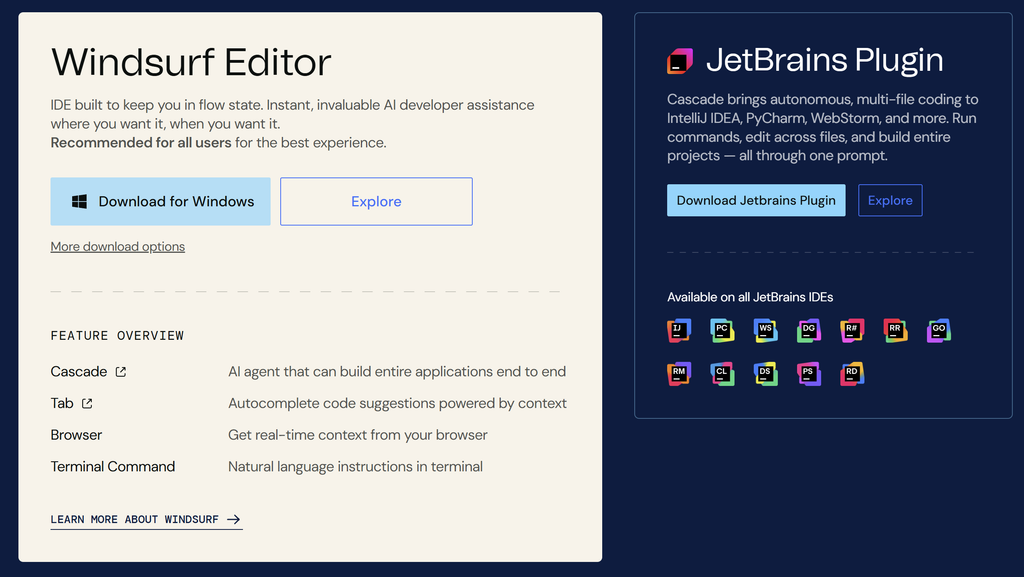
First, a Naming Note: Windsurf Is Now Devin Desktop
Windsurf began life as Codeium’s editor. Cognition, the company behind the Devin coding agent, acquired it in July 2025. According to public reports, the product was renamed Devin Desktop on June 2, 2026, with plans, pricing and extensions unchanged at the time of the rename .
Why this matters for you:
- Most people still search for “Windsurf,” so we use that name in this article.
- Billing, support and documentation may now appear under the Devin name.
- Product direction is tied to Cognition’s wider Devin strategy, which is worth weighing if you’re committing a team.
What Is Windsurf?
Windsurf is an AI-first code editor built on a VS Code foundation. You get ghost-text autocomplete, inline edits, a chat panel and Cascade, its agent for multi-file changes. Cascade shows you a plan and the diffs before you accept them.
Because it’s a full editor, everything lives in one window: your files, terminal, git tools and AI. If you’re coming from VS Code, the switch is small.
What Is Claude Code?
Claude Code is Anthropic’s coding agent. It reads your project, plans changes, edits files, runs commands such as tests and linters, and reacts to the output. It started in the terminal. It now also runs as a VS Code extension, a JetBrains plugin, a desktop app and on the web.
It has no autocomplete. You open a session, describe the task, and review what it did.
For deeper single-tool reads, see our Windsurf review and Claude Code review.
Autocomplete and Inline Suggestions
Windsurf has them. Claude Code does not.
Windsurf offers ghost-text completions as you type, plus a feature called Supercomplete that tries to predict your next edit from recent changes. It tends to help most with repetitive work: adding similar fields to a data model, writing parallel test cases, or filling in interface methods.
Claude Code has no inline suggestions at all. That’s a design choice, not a missing feature. It’s built for tasks you describe, not lines you type.
Some developers run Claude Code in a terminal next to an editor that has its own autocomplete. That works, but it can mean paying for two tools.
Winner: Windsurf, by default.
Codebase Understanding and Context
Both tools need to understand your project before they change it. They go about it differently.
Windsurf indexes your project and uses that map when Cascade plans changes. For a request like “move auth to refresh tokens,” it aims to find the middleware, token service and routes that need to change. Pre-indexing is fast, but it can miss links that aren’t obvious from imports, such as convention-based routing or event-driven code.
Claude Code explores as it works. It reads files on demand, follows imports, checks tests and looks at configuration before deciding what to change. That tends to suit questions that cut across several systems, such as how rate limiting interacts with a cache.
The trade-off is that any model has a finite context window. On very large repositories, Claude Code can’t hold everything at once, so it relies on targeted reading. Windsurf’s index can help keep it oriented on big projects.
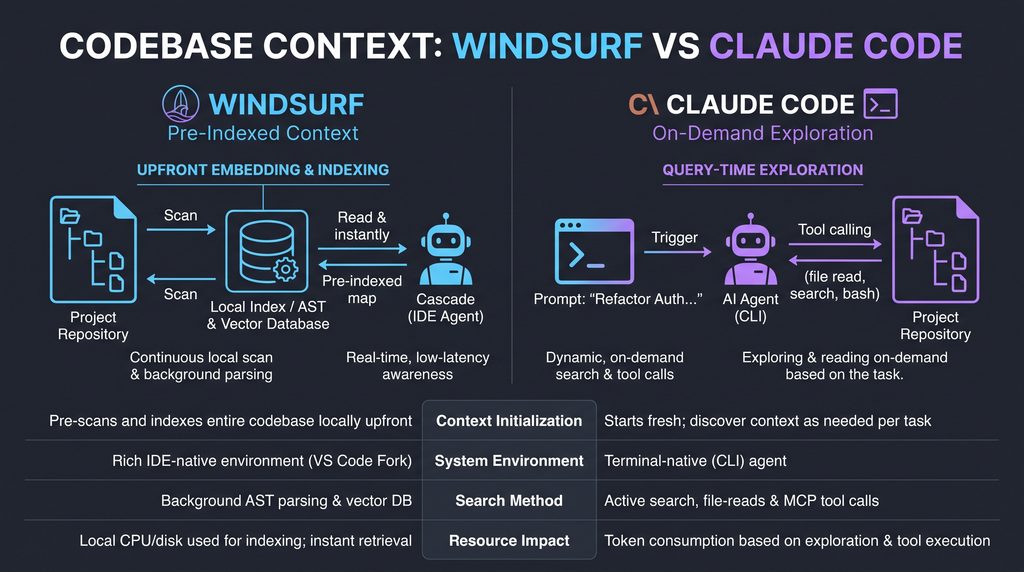
Winner: Claude Code for cross-cutting questions, according to vendor descriptions and user reports. Treat this as a general pattern, not a measured result.
Agentic Coding: Cascade vs Claude Code
This is the heart of the Windsurf vs Claude Code decision.
Windsurf’s Cascade agent
Cascade can plan a change across several files, run commands, check for errors and iterate. The visual flow is its strength: you see the plan, the files touched and the diffs before anything lands.
It’s a good fit for well-defined jobs, such as adding an API endpoint with validation and error handling. Users report it can be less reliable on open-ended work like tracing slow queries through several abstraction layers or designing a pattern that has to respect an existing event system.
Claude Code’s agent
Claude Code is an agent first, and everything else is built around that. A typical run looks like this:
- Read the relevant code and tests.
- Propose a plan.
- Edit files.
- Run the tests or build.
- Read any errors, fix them and run again.
That loop is the main reason developers pick it for refactors, performance work and large test suites. It also asks for permission before risky actions, which you can tune.
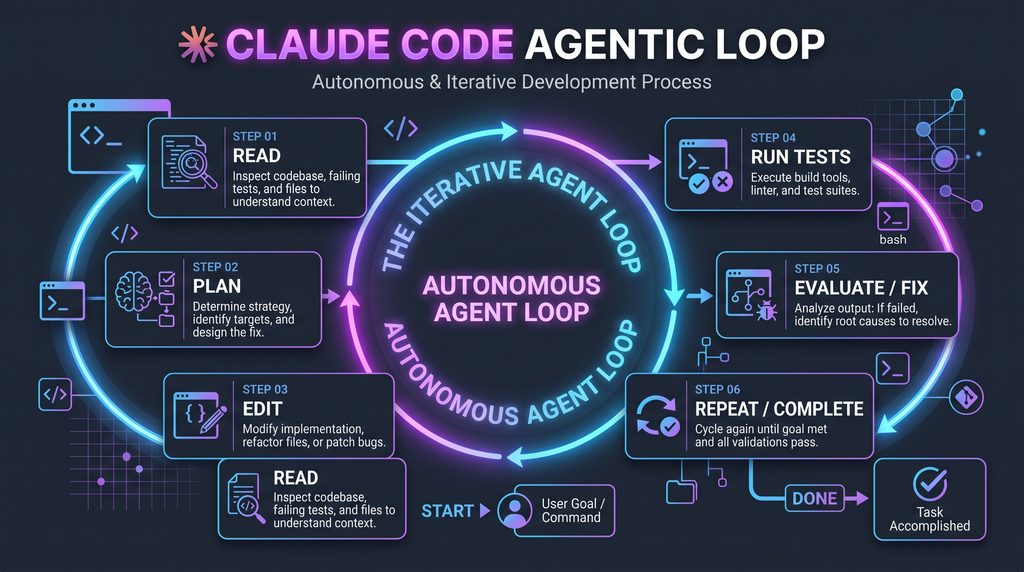
Winner: Claude Code for complex, multi-step jobs. Windsurf is the friendlier option for everyday feature work you want to watch.
Chat and Day-to-Day Interaction
Windsurf’s chat panel handles quick questions well: explain this function, suggest a fix, write a unit test. You can reference files, selections and terminal output.
Claude Code is conversational by nature. Every task is a conversation, and it keeps context across a long session, so you can design, build, add edge cases and write tests in one thread. It’s better suited to long, evolving jobs than to one-line questions.
Winner: a tie. Windsurf for quick lookups, Claude Code for long sessions.
Workflow and Editor Support
Windsurf is its own editor. You get a VS Code-style environment and extension ecosystem, but you work inside Windsurf. The editor is VS Code-based; check whether plugins for other IDEs are still supported before you rely on them.
Claude Code works from any terminal on macOS, Linux and Windows (Windows support details vary, so check the docs) . Because it’s editor-agnostic, you can pair it with VS Code, JetBrains, Neovim or anything else. It can also run non-interactively, which makes it scriptable for tasks such as code review or migration jobs in CI.
Winner: Windsurf if you want everything in one window. Claude Code if you live in the terminal or want automation.
Windsurf vs Claude Code Pricing (2026)
Both tools start at roughly the same entry price, but they scale very differently. Pricing for both has changed several times in 2026, so confirm everything on the official pages.
| Windsurf (Devin Desktop) | Claude Code | |
| Free | Free tier with limited usage | Not included on the free Claude plan |
| Individual entry | Pro, about $20/month | Claude Pro, $20/month, or about $17/month billed annually |
| Heavy use | Higher tiers and extra credits ,Max $200/month | Claude Max 5x at $100/month, Max 20x at $200/month |
| Teams | Team plans $80 a month-upto 200 users | Team seats (Standard and Premium) with Claude Code access |
| Enterprise | Custom or per-user pricing | Custom |
| Pay-per-use option | Extra credits on some plans | Anthropic API, billed per token |
What to watch:
- Windsurf moved to a quota-based usage system in 2026, so “unlimited” claims may not be literal. Read the plan details.
- Claude Code usage on Pro and Max is capped by rolling session and weekly limits. Developers who code with it for hours each day often report needing Max.
- Claude Code and Claude chat share the same usage allowance on subscription plans.
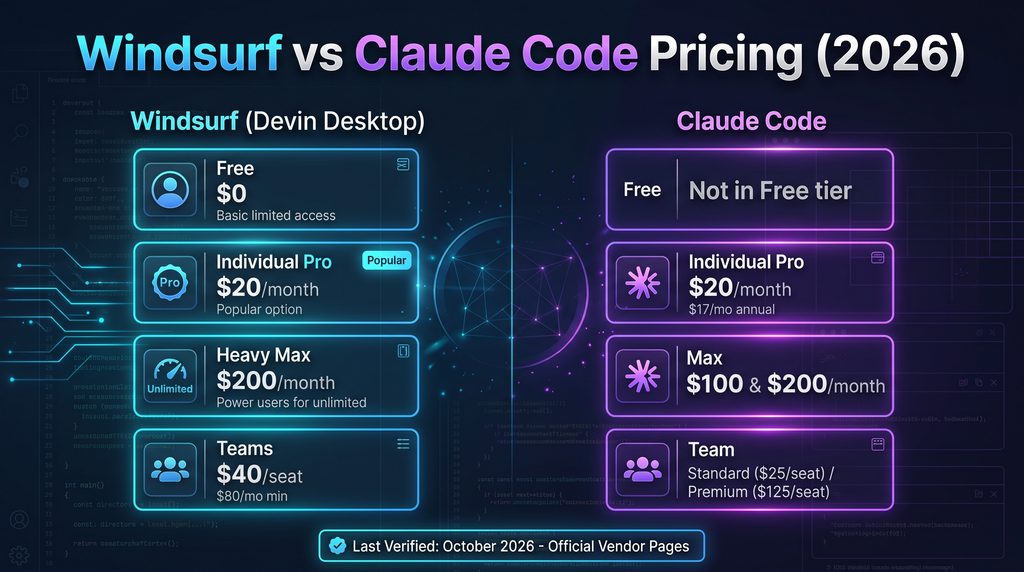
Winner on cost: Windsurf for light to moderate use, thanks to the free tier and similar entry price. For all-day agent use, expect Claude Code to cost more.
Pros and Cons
Windsurf (Devin Desktop)
Pros
- Autocomplete, inline edits, chat and an agent in one editor
- Visual plans and diffs before changes apply
- Free tier to try it out
- Access to models from several providers on paid plans
- Familiar for VS Code users
Cons
- You have to work inside its editor
- Agent can be less reliable on complex, open-ended work (per user reports)
- Rebrand and pricing changes make the roadmap harder to read
- Quota-based usage can be confusing
Claude Code
Pros
- Strong at multi-step tasks with a run-and-fix loop
- Explores your codebase on demand
- Works with any editor, and in the terminal, IDE extensions, desktop app and web
- Scriptable for automation
Cons
- No autocomplete
- No free plan
- Heavy use can push you to the $100+ tiers
- Terminal-first workflow isn’t for everyone
- Limited to Anthropic’s models
Who Each Tool Is Best For
Windsurf is best for:
- Developers who want an upgraded editor, not a separate agent
- People who value autocomplete and inline edits
- Budget-conscious solo developers
- Teams standardising on a VS Code-style environment
Claude Code is best for:
- Developers comfortable in the terminal
- Engineers who regularly face large refactors, migrations or test-writing
- Teams that want AI inside scripts and CI pipelines
- People who prefer to review finished work rather than guide every line
Can You Use Both?
Yes, and plenty of developers do, so Windsurf vs Claude Code doesn’t have to be either/or. A common setup is Windsurf for writing and quick edits, with Claude Code handling bigger tasks in a terminal pane.
There’s also a possible overlap. Reports say Devin Desktop supports an open protocol (Agent Client Protocol) that lets it run other agents, including Claude’s, inside the editor. If that holds for your plan, you may not have to pick one.
Verdict: Which Should You Choose?
| If you are… | Pick | Why |
| A solo user on a budget | Windsurf | Free tier, low entry price, autocomplete included |
| A solo developer doing big tasks | Claude Code (Pro first, Max if you hit limits) | Agent loop suits refactors and debugging |
| A small team | Start with Windsurf, add Claude Code seats for those doing heavy refactors | Keeps costs down and gives everyone a familiar editor |
| An enterprise | Run a pilot of both | Check security, data handling, SSO, compliance and vendor stability. Verify Cognition’s roadmap for Windsurf and Anthropic’s enterprise terms |
| A developer who loves the terminal | Claude Code | Fits your existing workflow and can be scripted |
| A developer who loves VS Code | Windsurf | Same feel, AI built in |
Our bottom line on Windsurf vs Claude Code: For editing and everyday coding, Windsurf is the practical choice. For delegating complex work, Claude Code is the stronger fit based on its design and user reports. If you’re unsure, trial the free options first and test both on the same real task from your own codebase.
Published and reviewed October 2026. We’ll update this page when pricing or features change.
FAQ
What is the best free alternative to Claude AI?
There’s no single best option. For general chat, the free tiers of ChatGPT, Google Gemini and Microsoft Copilot are common picks. For coding, Windsurf’s free tier is a good start. Free limits and models change often, so compare them on the vendors’ pages.
Is Windsurf better than Claude Code?
Neither wins everywhere. In the Windsurf vs Claude Code matchup, Windsurf is better if you want autocomplete, a visual editor and a lower entry cost. Claude Code is better for delegating complex, multi-step tasks like refactors and debugging. Many developers use both if their budget allows.
Does Claude Code have autocomplete?
No. Claude Code doesn’t provide inline suggestions or ghost text. It’s a task-based agent you ask to do work, not a typing assistant. If you want autocomplete as well, pair it with an editor that offers it, such as Windsurf or VS Code with another assistant.
Is Claude Code free?
Not on the free Claude plan. Claude Code needs a paid plan, starting with Claude Pro at about $20 a month, or pay-per-token API access. Usage limits differ by plan, and heavy daily users often move up to Max, so check Anthropic’s pricing page before you commit.
Is Windsurf still called Windsurf?
Not officially. Cognition renamed Windsurf to Devin Desktop in June 2026, and the old windsurf.com address reportedly redirects to Cognition’s Devin site. The editor itself is described as unchanged by the rename. Many people still search for “Windsurf,” so the name remains common and we use it here.