For most teams, CodeRabbit wins the Greptile vs CodeRabbit matchup in 2026. It supports more Git platforms, costs less per seat and produces less review noise. Greptile wins when your codebase is large and tangled, because it indexes the whole repository and is built to catch bugs that span several files.
This guide covers pricing for both, a feature table, GitHub and GitLab support, a repeatable sample pull request test, and who should pick which. Pricing was checked against vendor pages in early October 2026.
Quick Verdict Box
| CodeRabbit | Greptile | |
|---|---|---|
| Best for | Most teams, multi-platform shops, budget-conscious teams | Large or legacy codebases, cross-file bug hunting |
| Entry paid price | $24/dev/month (annual) | $30/seat/month |
| Git platforms | GitHub, GitLab, Bitbucket, Azure DevOps | GitHub, GitLab |
| Core approach | Diff plus context, filtered through linters | Full-repository index and dependency graph |
| Main trade-off | Fewer deep cross-file catches | More noise, credits can run out |

Greptile vs CodeRabbit at a Glance
Both tools install on your repository and comment on every pull request (PR). Both write a summary, post inline comments and let you reply to the bot in the thread. The difference is how much of your codebase each one reads before it speaks.
CodeRabbit reads the diff and surrounding context, then runs the result through a stack of linters and security scanners. The aim is fewer, more trustworthy comments.
Greptile indexes your entire repository into a map of files, functions and dependencies, then reviews each change against that map. The aim is catching the bug three modules away that a diff-only tool never sees.
In the Greptile vs CodeRabbit debate, neither approach is strictly better. It is a precision-versus-recall choice, and your tolerance for noisy comments decides it.
Feature Comparison Table
| Feature | CodeRabbit | Greptile |
|---|---|---|
| PR summaries and inline comments | Yes | Yes |
| Full-repository indexing | Context-aware, not a full graph | Yes, core feature |
| One-click fixes | Yes | Not really |
| Linters and security scanners | 40+ bundled | Built-in security check, newer feature |
| Learns your team’s style | Custom instructions | Long-term memory, scoped rules |
| Issue-tracker and docs context | Jira integration | Jira, Notion and Google Docs via MCP |
| Self-hosting | Enterprise | Enterprise, with bring-your-own-LLM |
| Free option | 14-day trial; free public repos | Free for 1 developer; free for qualified open source |
“MCP” (Model Context Protocol) is a standard way for an AI tool to pull in outside context, like a ticket or a spec document.
Supported Platforms: GitHub and GitLab
Both tools work with GitHub and GitLab, so on platform support Greptile vs CodeRabbit is a tie for most readers.
The gap shows up beyond those two. CodeRabbit also lists Bitbucket and Azure DevOps. Greptile’s public materials focus on GitHub and GitLab, and one third-party comparison says it has no Bitbucket support. If your team lives in Bitbucket or Azure DevOps, check this before anything else.
CodeRabbit Pricing and Greptile Pricing in 2026
Both vendors changed their pricing pages recently, so older Greptile vs CodeRabbit comparisons are out of date. These figures come from the vendors’ own pages in October 2026 .
CodeRabbit pricing (per developer, per month):
| Plan | Annual billing | Monthly billing |
|---|---|---|
| Essentials (formerly Pro) | $24 | $30 |
| Team (formerly Pro Plus) | $48 | $60 |
| Advanced | $72 | Annual only |
| Enterprise | Custom | Custom |
CodeRabbit says every plan includes a 14-day trial. Extra reviews beyond your hourly allowance cost $0.25 per file if usage billing is on, and the separate CodeRabbit Agent add-on costs $0.40 per minute. Each tier also caps reviews per hour and linked repositories, so check the limits, not just the headline rate.
Greptile pricing:
| Plan | Price | What you get |
|---|---|---|
| Starter | Free | 1 active developer, unlimited repos, 50 credits/month |
| Pro | $30/seat/month | 50 credits per seat, extra credits $1 each |
| Enterprise | Custom | Self-hosting, SSO/SAML, bring-your-own-LLM |
Greptile bills in credits: a Base review costs 1, a Plus review 3, and an Apex review 10. Overage is calculated per developer, not pooled across the team. An “active developer” is anyone with at least one completed review in the billing period.
A worked example. Ten developers on CodeRabbit Essentials (annual) cost $240 a month. Ten on Greptile Pro cost $300 a month before overage. If one developer relies on Plus reviews, 17 reviews use up their 50 credits, and every review after that costs $1 per credit. Heavy PR volume is where Greptile’s bill drifts upward.
Review Quality: The Same Sample Pull Request
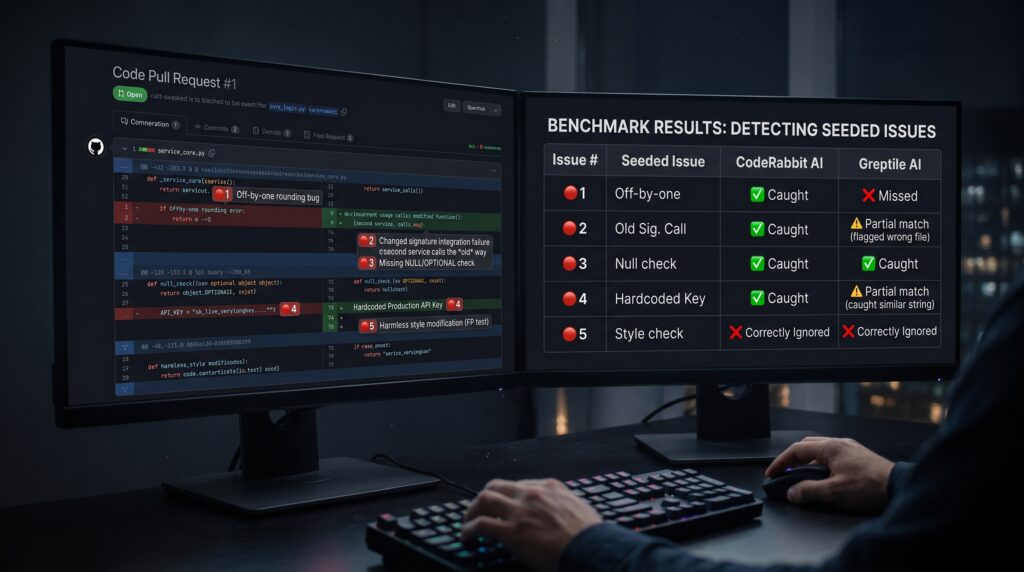
The sample PR. Create a small PR on a test repo (a checkout service works well) with five seeded issues:
- An off-by-one error in a discount rounding function.
- A changed function signature that a second service still calls the old way.
- A missing null check on an optional field.
- A hardcoded API key.
- A harmless style change (to test false positives).
What Published Benchmarks Say (and Their Limits)
Greptile’s own July 2025 benchmark reports an 82% bug catch rate across 50 PRs in five repositories. In that same test, CodeRabbit scored 44%. Greptile ran the test itself, and several review sites call it independent when it is not.
An Augment Code comparison notes that Greptile’s recall on the third-party Martian leaderboard is substantially below its self-reported figure. That comparison comes from a competing vendor, so weigh it accordingly. Third-party reviews also report Greptile producing more false positives than CodeRabbit in the same benchmark (about 11 versus 2).
The fair reading of the Greptile vs CodeRabbit benchmarks: Greptile is tuned to catch more, CodeRabbit is tuned to bother you less, and no vendor-run number replaces a test on your own code.
CodeRabbit: Pros, Cons and Who It’s Best For
Pros
- Widest platform coverage of the two.
- Lower per-seat price and flat per-developer billing.
- Lower reported noise, helped by linter filtering.
- Free trial and free public-repo reviews.
Cons
- Less depth on bugs that span many files.
- Review limits per hour and per tier can bind before price does.
- Enterprise pricing is not published.
Best for: small and mid-size teams, Bitbucket or Azure DevOps users, and anyone who wants a predictable bill.
Greptile: Pros, Cons and Who It’s Best For
Pros
- Full-repository context for cross-file bugs.
- Memory and scoped rules that adapt to your conventions.
- Self-hosting and bring-your-own-LLM on Enterprise.
- Free for qualified open source and one-developer use.
Cons
- Higher reported false-positive rate.
- Credit overage makes costs less predictable.
- Narrower platform support.
Best for: large monorepos, legacy systems, and teams where one missed bug costs more than extra review noise.
Verdict: Which AI Code Review Tools Should You Pick?
| Reader type | Pick | Why |
|---|---|---|
| Solo developer | CodeRabbit (trial) or Greptile Starter | Both let one person try before paying |
| Small team (2-15) | CodeRabbit | Lower seat price, less noise to triage |
| Enterprise | Run a pilot on both | Compare self-hosting, SSO and quotes in writing |
| Developer on a big codebase | Greptile | Full-repo context pays off at scale |
Whichever tool wins your Greptile vs CodeRabbit shortlist, keep a human reviewer before merge and treat the bot as a fast first pass. Run the sample PR test above, and let your own false-positive rate decide.
FAQ
Is CodeRabbit better than Greptile?
It depends on what you need. CodeRabbit supports more Git platforms, costs less per seat and reportedly produces less noise. Greptile indexes your whole repository and is built to catch more cross-file bugs, at the cost of more false positives. For most teams CodeRabbit is the safer default.
Does Greptile support GitHub?
Yes. GitHub is Greptile’s primary platform, and it also supports GitLab. Public materials do not clearly list Bitbucket or Azure DevOps support, and one third-party comparison says Bitbucket is unsupported . Check Greptile’s current documentation if your team uses either of those platforms.
Does Greptile have a catch rate?
Greptile publishes one: 82% of seeded bugs across 50 pull requests in its July 2025 benchmark. Greptile ran that test itself, so treat it as a vendor claim. An independent leaderboard comparison reports a substantially lower recall for Greptile, so test it on your own repository.
What is Greptile’s 82% bug catch rate?
It is the share of seeded bugs Greptile flagged in its own benchmark of 50 real-world pull requests across five repositories. CodeRabbit scored 44% in the same test. The figure measures recall, not noise, and Greptile also produced more false positives, so a high catch rate alone does not make a better reviewer.
Does CodeRabbit support GitLab?
Yes. CodeRabbit supports GitHub and GitLab, and its materials also list Bitbucket and Azure DevOps . That makes it the more flexible choice for teams that do not use GitHub exclusively. Confirm the specifics for your self-hosted or enterprise setup with the vendor before committing.